
The New York times story “Growing Up Digital, Wired for Distraction” point out many of the ways that technology is ingrained in our students lives and what that means for teaching, learning and distraction.
But distraction isn’t anything new. Whether students pass notes, doodle in their notebook, or stare out the window, distraction has always been part of a student life.
Now, you can say that technology has taken distraction to a different level and with social media, text messages, instant messages, smart-phones and games, one would argue that we face a difficult battle. But it is not one that we can’t win.
One of biggest topics we discussed at my school prior to the launch of or 1:1 initiative was how to deal with distraction. Students had already been bringing in laptops prior to the start of our program and every kid seemed to have a smart-phone or iPod with them wherever they went, so this was not a new issue for us, per se. But now, by giving every student a Macbook Pro we would need to take the issue of distraction head on.
How to do it if you’re a teacher. Design for Distraction. Design your classrooms, your instruction and you conversations to deal with distraction.
1. Establish Classroom Norms – You know students are distracted. I know students get distracted. Let’s talk about the things that you can do to help minimize distraction while in the classroom and keep students focused on the lesson.
Let them come up with the ways they can keep themselves on task. This is not the time for you to “lay down the law” and by involving them in the process you allow them to take ownership of the problem.
This sounds simple… but having this type of conversation with your students at the start of the year can make all the difference.
2. The Physical Space – If you are going to teach in a classroom with technology you cannot keep the seats in rows. You need to be able to move around the room. Rearrange your classroom so that you can easily see what is going on. You shouldn’t always be at the front of the room anyway!
By rearranging the space you can also help reinforce the norms you help establish in the first place. A gentle hand on a students shoulder can remind them to refocus when needed and when they know you will be moving around more they are less likely to “wander off” to web sites or instant message a friend.
3. Use the Technology to Help – There are so many ways that you can use the technology to help minimize distraction. On our MacBooks student can use Spaces to create virtual work spaces where only the tools they need for the class can be available. Students can also remove items from their Dock that can tempt them to become distracted. By removing iChat, Skype or their Twitter app (that may be more me than the students) they will be less likely to launch the application.
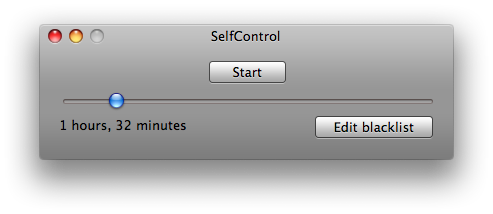 There are also applications that students can install on their computer to help. “Self Control” is one such application. It allows you to block access to certain applications, web site or services for a set period of time. Once set you can not bypass the application. Restarting the computer or deleting the application will not work; you need to wait the prescribed time.
4. Using the Right Tool – Students (and teachers) need to realize what the right tool is for the task at hand… and that tool may not be the laptop. Telling students to close their laptops or put them away needs to be something that you feel you can do. Often in 1:1 programs there is a feeling that you have to use the laptop all the time. That is just not the case.
5. Good Teaching – It all comes down to you. I hate to say it, but if kids were easily distracted in you class before they had access to technology, they are going to be even more distracted by the technology. Good professional development and a good support structure is important to have in any school and in particular when you are working with technology.
Often the students may know more than you about how to use the applications or the hardware, but remember you are the one that can help guide them in its appropriate use. You don’t need to know every aspect of the tool, but you do need to understand it’s how it can or can’t be applied in your area. If you don’t, just ask. Ask a colleague, ask you curriculum support person, or even ask your student(s). Have him or her explain why the tool is the right one for them to be using.
6. Engage the parent body – It doesn’t end in the classroom. Your school should be addressing this issue with the parents as well. Through newsletters, during conferences, in parent meetings, by whatever means you have at your disposal you should be talking about this with your parents. No good teaching is done without the support of parents at home and this is not different.
You need to let parents know what you are doing to address this issue in school and what they can do at home as well. The parent that says that they can’t control their child’s Internet use at home or the amount of time they spend playing games is simply not parenting. Help support them in their homes.
***
Locking down computers, confiscating smart-phones and blocking social media sites does nothing to teach students how to deal with distractions for themselves. All this does it tell them that it’s someone else’s responsibility or puts up walls for them to spend their time trying to get around… and we can’t afford an arms race.
Please let me know what your thoughts are on dealing with distraction in your school or classroom and share you thoughts below.
Additional Resources (add 11/23/2010):



William,
Thanks for the practical response to the Times piece. Your post offers concrete options for teachers already using technology in their classrooms. These are great suggestions for the tech-infused classroom, but what would you say to the teachers in the Times piece who seem to believe that technology is the distractor getting in the way of the learning that ought to be occurring in their classrooms? The author seems to set up the paradigm that either you are successful student and technology is a separate component of your life outside of school, or the technology outside of school gets in the way of the “real” learning that should be occurring in school. I don’t buy the paradigm, but many teachers, administrators, parents, and superintendents do. Your thoughts?
Thanks for the post,
Eric Juli
I think that it comes down to the conversations with faculty about what it means to prepare our students for the world they will be entering once they graduate. I look at the way that I learn now, the way that I work and share information and wonder how I would be able to do any of it without technology.
Maybe you won’t get through to the teacher, but you need to engage them in the conversation if only to involve them in it.
I’d like to follow up on what Eric said. I, too, noticed that inherent presumption that technology and learning were separate. The assumption seemed to be that computers were used for distraction from learning, whereas I know from my own son’s experience that computers can be used for learning as well. At the same time, it seemed to me that most of the examples of technology distraction mentioned in the article were outside of school–in which case, it is a parental problem, rather than a school problem (at least, not directly). Your suggestions above do nothing for the student in the article who reported playing video games four hours a day after school.
I thought I’d throw in one more technology solution: to keep students focused during discussion, I assign a designated notetaker for every class, whose job it is to keep a record of what is said in class discussions in a Google docs document just for that purpose. That allows me to tell students to close their laptops during discussions, and also allows students to focus on the discussion without having to worry about taking notes. Students can also use the notes as an additional resource when studying for tests. In a recent survey I did of students, a large majority found the notes useful.
David
I try to point out above where you need to engage the parents. Since you post I have tried to highlight that point more clearly… thanks for the suggestion.
As for the notetaker suggestion… I love it. It is one I heard before and thing can be very good (so long as you have a good notetaker).
Thanks for the comment and adding to the discussion.
Yes, you’re right, I misspoke (or mis-wrote). You definitely address it. Call it “poor internet reading syndrom” on my part. Still, I think it points out a fundamental issue in the Times piece, namely, blaming technology for problems whose fundamental problems lies elsewhere. I’m not an unqualified technology booster. The reading I’ve done suggests it’s important to put computers, phones, iPad, etc. aside at times. However, that’s different from the “technology is bad” viewpoint that the Times article seems to take. I think it’s more like “technology is bad for some things and good for others.”
Thanks for sharing this perspective. The NYT article should have highlighted how some of us “laptop schools” are successfully managing the distraction issue. Curiously, the 8 teacher-created videos with the story showed classroom technology use in a much more positive light than depicted in the article.
I think for those schools that are involved in 1:1 Initiatives the able to manage much of this through the norming of behaviors and classroom practice.
Your post is spot on… just as we say that tech alone isn’t the cool tool that makes the difference, but it can if the pedagogy around it is shifted, in this instance the reverse is true. Tech isn’t the bad guy causing distraction, but it can if teachers, students and parents are asleep at the wheel and don’t change the operating norms. There are plenty of schools and students, teachers and families who have done just that. Too bad the NYT piece didn’t use its platform to celebrate some of those new, successful ways.
And now…the other side of the argument. http://www.williamstites.net/2010/11/22/design-for-distraction/
Great post Bill. I especially like you comment “we can’t afford an arms race.” It reminds me of high school in the 90’s when a teacher band the use of TI calculators!
Pingback: Engaging, not Distracting, the Digital Generation: Responding to the Times’ Wired piece « 21k12
Pingback: Design for Distraction | williamstites.net | JimButt.Info